
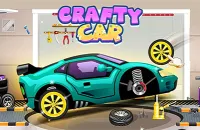



































































Play Crafty Car Online
Get ready to experience an exciting driving adventure with Crafty Car! This fun and engaging car game lets you jump right into the action directly from your web browser. No need to worry about downloads or installations—Crafty Car online offers a smooth and accessible way to enjoy fast-paced car gameplay anytime you want. Whether you're a casual player or just looking for a quick game to pass the time, Crafty Car is easy to pick up and hard to put down.
About Crafty Car
Crafty Car is a browser-based car game that challenges players to navigate tricky courses and showcase their driving skills. With its simple yet captivating concept, the game invites you to control a car through various levels, focusing on speed, precision, and clever maneuvering. The goal is to complete each stage while avoiding obstacles and making the best use of your car’s abilities. Its straightforward gameplay and engaging mechanics make it suitable for players of all ages, especially kids and casual gamers who enjoy car games.
How to Play Crafty Car
The objective in Crafty Car is to drive your vehicle through the course successfully, overcoming obstacles and reaching the finish line as quickly as possible. To start playing, simply load the game in your browser and use the controls to steer your car. Pay attention to the terrain and obstacles, and try to maintain control at all times. With practice, you’ll improve your driving skills and be able to complete more challenging levels.
Mastering Speed and Precision in Crafty Car
Success in Crafty Car relies heavily on your ability to balance speed with careful control. Driving too fast might cause you to crash into obstacles or lose control on sharp turns, while driving too slowly could affect your overall time and score. Learning when to accelerate, when to brake, and how to handle tricky sections of the course is essential. This balance keeps the gameplay engaging and encourages players to think strategically about their driving approach.
Crafty Car Controls
Controls in Crafty Car are designed to be simple and easy to use, making it a great choice for players of all skill levels. Depending on your device and browser setup, you may use keyboard, mouse, or touch controls to navigate your car through the levels. Here are the typical control options you might use:
- Arrow keys or WASD keys for steering and acceleration/braking
- Mouse clicks or movements for directional control
- Touch gestures on mobile or touchscreen devices for steering
Tips and Tricks for Crafty Car
- Start slow to get familiar with the course layout before increasing your speed.
- Practice controlling your car’s movement to avoid crashing into obstacles.
- Use smooth steering rather than sharp turns to maintain better control.
- Keep an eye on the road ahead to anticipate upcoming challenges.
- Try replaying levels to improve your time and driving skills.
Why Play Crafty Car on Adventuregames.io?
Playing Crafty Car on Adventuregames.io means you can enjoy this entertaining car game right in your browser with no download required. This makes it quick and hassle-free to start playing anytime, anywhere. The website also offers a wide variety of similar browser games, so you can discover other exciting titles after finishing your session. The simple access and variety make Adventuregames.io a great place to enjoy casual games like Crafty Car.
Similar Games You May Like
If you enjoy Crafty Car, you might also like these other fun car and racing games available on Adventuregames.io:
Frequently Asked Questions About Crafty Car
Is Crafty Car free to play?
Yes, Crafty Car is completely free to play online. You can enjoy the game without any cost directly from your web browser.
Can I play Crafty Car online?
Absolutely! Crafty Car is designed to be played online in a browser, so you don’t need to install anything to start driving.
Do I need to download Crafty Car?
No download is required to play Crafty Car. Since it runs in your browser, you can jump straight into the game without any extra steps.
What are the controls for Crafty Car?
Controls may vary depending on your device, but typically you can use keyboard keys (such as arrow keys or WASD), mouse, or touch controls to steer and accelerate your car.
How can I improve my driving skills in Crafty Car?
Practice is key! Take your time to learn the course, master the timing of turns, and control your speed carefully. The more you play, the better you’ll get at handling tricky sections and completing levels quickly.
Comments
No comments yet. Be the first to comment.