





































































Play Crazy Chicken 3d Online
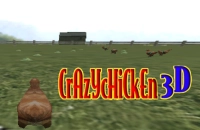
Crazy Chicken 3d is a fun and casual browser game that invites players to enjoy a lively 3D adventure featuring a quirky chicken character. With its colorful graphics and entertaining gameplay, it offers a great way to relax and have fun during short breaks. Best of all, you can play Crazy Chicken 3d online right in your browser with no download required, making it easy to jump into the action anytime you want.
About Crazy Chicken 3d
Crazy Chicken 3d is a casual game where players control a spirited chicken navigating through a 3D environment. The goal is to complete challenges or levels by moving the chicken around obstacles, collecting items, or reaching objectives. The game’s simple concept, combined with its engaging 3D visuals, makes it appealing to players of all ages, especially kids and casual gamers looking for quick, enjoyable gameplay sessions.
How to Play Crazy Chicken 3d
Starting Crazy Chicken 3d is easy: just load the game in your browser and follow the on-screen prompts to begin. Your main objective is to guide the chicken safely through the game's environment, avoiding obstacles and gathering any collectibles along the way. The gameplay is straightforward, allowing you to focus on having fun rather than learning complex mechanics.
Simple Fun for Quick Playtime
One of the standout features of Crazy Chicken 3d is its casual nature, perfect for players who want quick bursts of fun without deep commitment. The game’s colorful 3D world and lighthearted theme create a cheerful atmosphere that’s easy to enjoy. Whether you have just a few minutes to spare or want to unwind with an entertaining challenge, Crazy Chicken 3d provides a delightful experience that’s both accessible and engaging.
Crazy Chicken 3d Controls
The controls for Crazy Chicken 3d are designed to be intuitive and player-friendly. Depending on the device you use, you might control the chicken with the keyboard, mouse, or touch screen.
- Keyboard: Use arrow keys or WASD to move the chicken
- Mouse: Click or drag to navigate or interact
- Touch: Tap or swipe to control movement on touch devices
Tips and Tricks for Crazy Chicken 3d
- Take your time to learn the layout of each level before rushing ahead.
- Watch out for obstacles and plan your moves carefully to avoid losing progress.
- Collect any items or bonuses you see to improve your score or unlock extras.
- Practice makes perfect—replaying levels can help you master tricky spots.
- Use smooth and steady controls to keep your chicken safe and on track.
Why Play Crazy Chicken 3d on Adventuregames.io?
Playing Crazy Chicken 3d on Adventuregames.io offers a convenient and hassle-free experience. You can start the game immediately in your browser without any downloads or installations. This makes it perfect for quick gaming sessions whenever you want. Plus, the site provides easy access to many other fun casual games, so you can explore new adventures after playing Crazy Chicken 3d.
Similar Games You May Like
If you enjoy Crazy Chicken 3d, you might also like these entertaining casual and 3D games that offer fun challenges and exciting gameplay:
Frequently Asked Questions About Crazy Chicken 3d
Is Crazy Chicken 3d free to play?
Yes, Crazy Chicken 3d is completely free to play online in your browser with no cost involved.
Can I play Crazy Chicken 3d online?
Absolutely! Crazy Chicken 3d is designed to be played online directly in a web browser, allowing quick access without extra steps.
Do I need to download Crazy Chicken 3d?
No download is necessary. The game runs smoothly in your browser, so you can start playing right away without installing anything.
What are the controls for Crazy Chicken 3d?
The controls may vary depending on your device but generally include keyboard keys, mouse clicks, or touch gestures to move and interact with the game.
Is Crazy Chicken 3d suitable for kids?
Yes, the game features simple, fun gameplay and colorful graphics that make it appropriate and enjoyable for kids and casual players alike.
Comments
No comments yet. Be the first to comment.