

































































Play Crossy Road Online
Crossy Road is a fun and addictive car-themed browser game where players navigate their character safely across busy roads, rivers, and other obstacles. This game offers a simple yet challenging experience that’s perfect for kids and casual players looking for quick entertainment. You can play Crossy Road online directly in your browser with no download required, making it easy to jump into the action anytime you want.
About Crossy Road
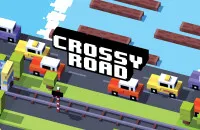
In Crossy Road, the main goal is to help your character cross roads filled with fast-moving cars, rivers with floating logs, and other tricky obstacles without getting hit or falling in the water. It’s a modern take on the classic “Frogger” style game where timing, patience, and quick reflexes are key. The game’s colorful, blocky graphics and simple mechanics make it approachable and fun for players of all ages.
How to Play Crossy Road
Starting Crossy Road is easy—just open the game in your browser and begin your journey. Your character will try to move forward one step at a time, and you’ll control their movements to avoid dangers like cars and rivers. The objective is to keep moving forward as far as possible without being hit or falling. Each successful jump earns you points and rewards, encouraging you to beat your own high score.
Mastering Timing and Focus in Crossy Road
One of the unique challenges of Crossy Road is mastering the timing of your jumps. Since cars and logs move at different speeds, players need to carefully watch patterns and plan their moves. Staying focused and patient will help you avoid collisions and keep progressing. Quick reflexes come in handy, but careful observation is just as important to cross safely and rack up a high score.
Crossy Road Controls
The controls for Crossy Road are simple and intuitive, designed to work well on many devices. Depending on where you play, you may use your keyboard, mouse, or touch screen to control the character.
- Use arrow keys or WASD on your keyboard to move forward, backward, left, and right.
- Click or tap on the screen to make your character jump forward or move sideways.
- On touch devices, tap the screen to move step by step.
Tips and Tricks for Crossy Road
- Watch the traffic patterns carefully before crossing the road to avoid getting hit.
- Wait for the right moment to jump onto moving logs or platforms to cross rivers safely.
- Try to keep moving forward steadily—staying still too long might cause other dangers to catch up.
- Practice makes perfect! The more you play, the better you’ll get at judging timing and distances.
- Use the sides of the screen to avoid heavy traffic in the middle lanes.
- Keep an eye on the edges where new obstacles appear to stay prepared for what’s next.
Why Play Crossy Road on Adventuregames.io?
Playing Crossy Road on Adventuregames.io is a great choice because you can start the game instantly with no download or installation needed. The browser-based setup means you can enjoy quick gaming sessions from any compatible device. Plus, the platform makes it easy to discover other similar car and casual games, ensuring you always have something fun to play next.
Similar Games You May Like
If you enjoy the fast-paced, obstacle-avoiding fun of Crossy Road, you might like these other exciting car and casual games:
Frequently Asked Questions About Crossy Road
Is Crossy Road free to play?
Yes, Crossy Road is free to play online, allowing anyone to enjoy the game without any cost.
Can I play Crossy Road online?
Absolutely! You can play Crossy Road online directly in your browser without needing to download anything.
Do I need to download Crossy Road?
No download is required to play Crossy Road online. Simply open the game in a browser and start playing instantly.
What are the controls for Crossy Road?
Controls usually involve using your keyboard arrow keys or WASD, clicking with a mouse, or tapping on touch screens to move your character forward, backward, left, or right.
Can I play Crossy Road on different devices?
Yes, Crossy Road can be played on various devices that support web browsers, such as computers, tablets, and smartphones.
Comments
No comments yet. Be the first to comment.