









































Play Minecraft Online
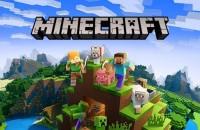
Minecraft is a fun and creative casual game that lets you explore, build, and survive in a blocky world made entirely of cubes. Whether you want to craft impressive structures, dig for resources, or simply enjoy an open sandbox adventure, Minecraft offers a unique experience for players of all ages. The best part is you can play Minecraft online right in your browser with no download required, making it easy and quick to jump into the game anytime you want.
About Minecraft
In Minecraft, players enter a vast, pixelated world where they can gather materials, craft tools, and build anything from simple homes to grand castles. The game falls under the casual games category, offering a relaxed and creative environment without the need for complex setups. Although it is played online, the game maintains the core appeal of the well-known Minecraft concept, focusing on exploration, creativity, and survival challenges. It’s a great choice for kids and casual players looking for an engaging and easy-to-access game.
How to Play Minecraft
Starting Minecraft online is straightforward. Once you open the game in your browser, you’ll find yourself in a 3D block world where your goal is to collect resources like wood, stone, and ores. Use these materials to craft tools, build shelters, and protect yourself from any dangers that may appear. Explore the world freely, experiment with building, and enjoy the open-ended gameplay. The game encourages creativity and problem-solving, allowing you to set your own goals and adventures.
Enjoy Simple and Relaxed Gameplay
Minecraft online is perfect for casual play sessions where you can relax and have fun without pressure. The game’s simple mechanics and blocky graphics make it accessible to beginners and enjoyable for players who want a break from more intense games. You can focus on building cool structures, exploring caves, or simply wandering the landscape at your own pace. This relaxed gameplay style makes Minecraft a great choice for kids and anyone looking for a stress-free gaming experience.
Minecraft Controls
The controls in Minecraft online are designed to be easy to use for players of all skill levels. Typically, the game uses keyboard and mouse inputs, but some versions may support touch controls depending on your device.
- Use the arrow keys or WASD to move your character around.
- Use the mouse to look around and interact with objects.
- Left-click to break blocks or attack.
- Right-click to place blocks or use items.
- Use the number keys to switch between tools and items.
Tips and Tricks for Minecraft
- Start by gathering basic resources like wood and stone to craft essential tools.
- Build a shelter early to protect yourself from any threats during the night.
- Explore caves carefully to find valuable ores but watch out for hazards.
- Use crafting recipes to make better tools and items as you progress.
- Experiment with building different structures to improve your creativity.
- Take breaks and enjoy the peaceful parts of the game to prevent frustration.
Why Play Minecraft on Adventuregames.io?
Playing Minecraft online at a site like Adventuregames.io offers quick and easy access without the need for any download. You can jump into the game instantly from any browser, making it perfect for short play sessions or when you want to try the game on a new device. Plus, you can discover many other casual games similar to Minecraft, expanding your gaming options and keeping the fun going.
Similar Games You May Like
If you enjoy Minecraft, you might also like these other creative and casual games available to play online:
Frequently Asked Questions About Minecraft
Is Minecraft free to play?
Yes, you can play Minecraft online for free through browser versions like this one, allowing you to enjoy the game without any cost.
Can I play Minecraft online?
Absolutely! Minecraft is available to play online directly in your web browser, so you can enjoy it without downloading anything.
Do I need to download Minecraft?
No download is needed to play Minecraft online on this platform. Just open the game in your browser and start playing right away.
What are the controls for Minecraft?
Controls usually involve using the keyboard and mouse. You move with the arrow keys or WASD, look around with the mouse, and use clicks to interact with blocks and items.
Can kids play Minecraft online safely?
Minecraft online is designed to be kid-friendly and easy to understand, making it a great choice for young players who want a creative and safe gaming experience.
Comments
No comments yet. Be the first to comment.