




























































Play Minesweeper Online
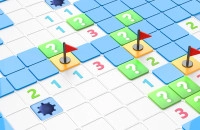
Minesweeper is a classic casual game that challenges your logic and careful thinking. Players can enjoy a fun and engaging experience by uncovering hidden mines on a grid without triggering any explosions. The game is perfect for kids and casual players who like a mix of strategy and luck. You can play Minesweeper online directly in your browser at FreeGeometryDash.com, with no download required, making it easy to jump into the action anytime and anywhere.
About Minesweeper
Minesweeper is a simple yet captivating game where the main goal is to clear a grid filled with hidden mines. Each square on the grid may hide a mine or be empty. When you click on a square, it reveals a number indicating how many mines are adjacent to that square. Using this information, you need to figure out which squares are safe to click and which contain mines. The challenge lies in using logic to avoid mines and clear the entire field.
How to Play Minesweeper
The objective of Minesweeper is to uncover all safe squares without clicking on any mines. At the start, you click on any square to reveal numbers or empty spaces. These numbers help you deduce where the mines are located. If you suspect a square contains a mine, you can mark it with a flag to avoid accidentally clicking it later. The game ends when you either uncover all non-mine squares or accidentally click a mine. The faster and more accurately you clear the board, the better your score.
Thinking Ahead and Planning Your Moves
Minesweeper is a game that rewards careful thought and planning. Each move should be made by analyzing the numbers revealed, considering the location of flagged mines, and predicting safe squares. Avoid random clicks, especially as the grid fills up, and try to solve the puzzle step-by-step. Developing a strategy to tackle different patterns will improve your chances of winning and make the game more enjoyable.
Minesweeper Controls
The controls for Minesweeper are straightforward but may vary slightly depending on your device. Typically, you can use the mouse, keyboard, or touch screen to interact with the game.
- Left-click (or tap) to reveal a square.
- Right-click (or long press) to place or remove a flag on a square you suspect contains a mine.
- Some versions may allow keyboard shortcuts for flagging or revealing tiles.
Tips and Tricks for Minesweeper
- Start by clicking near the center of the grid to reveal more information early.
- Use flags to mark suspected mines and avoid accidental clicks.
- Pay close attention to numbers and how they relate to adjacent squares.
- Look for common patterns such as “1-2-1” which indicate mine placements.
- Take your time and think carefully before each click to reduce mistakes.
- If you're stuck, try to guess the safest option based on the available clues.
Why Play Minesweeper on Adventuregames.io?
Playing Minesweeper on Adventuregames.io offers quick and easy access to this timeless game without the need to download or install anything. The browser-based setup means you can enjoy a game session in just seconds, whether you’re on a computer, tablet, or smartphone. It’s a great way to sharpen your brain with simple, casual fun. Plus, you can discover many other games like Minesweeper to keep the entertainment going.
Similar Games You May Like
If you enjoy Minesweeper, you might also like these games that offer fun and engaging casual gameplay with puzzle or strategy elements:
Frequently Asked Questions About Minesweeper
Is Minesweeper free to play?
Yes, Minesweeper is free to play online, allowing you to enjoy the game without any cost.
Can I play Minesweeper online?
Absolutely! Minesweeper can be played online directly in your web browser, providing easy access anytime.
Do I need to download Minesweeper?
No download is necessary to play Minesweeper online. You can start playing instantly without installing anything.
What are the controls for Minesweeper?
Generally, you use the mouse or touch controls to click and flag squares. Right-clicking or long-pressing places flags, while left-clicking reveals squares.
How do I avoid hitting mines in Minesweeper?
Pay close attention to the numbers on revealed squares, use flags to mark mines, and think logically about which squares are safe to click.
Comments
No comments yet. Be the first to comment.