





















































Play Plants Vs Zombies Online
If you love fun and strategic casual games, then playing Plants Vs Zombies online is a great choice. This entertaining game lets you defend your home from waves of funny and quirky zombies by planting a variety of imaginative plants. The best part is you can enjoy it right in your browser with no download needed, making it easy and quick to jump into the action anytime you want.
About Plants Vs Zombies
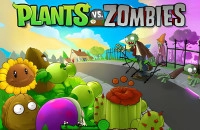
Plants Vs Zombies is a casual strategy game where players use different types of plants to stop zombies from reaching their house. Each plant has unique abilities, such as shooting peas, blocking enemies, or exploding on impact. As you progress, the zombie waves become more challenging, requiring smart placement and quick thinking. The game combines humor, creativity, and light strategy, making it enjoyable for kids and casual players alike.
How to Play Plants Vs Zombies
The goal in Plants Vs Zombies is simple: protect your garden from invading zombies by placing plants strategically on your lawn. You start with a selection of plants and a limited amount of sun points, which are used as currency to plant defenses. Sun points can be collected by certain plants or falling sun icons. Zombies march across the screen in lanes, and it's your job to stop them before they reach your house. As you defeat zombies, you earn more sun points to plant stronger defenses.
To begin playing, select the plants you want to use from the available list, then click on the lawn spots to place them. Watch the zombies carefully and adjust your strategy as new types of zombies appear.
Quick and Casual Fun with Plants Vs Zombies
This game is perfect for casual players looking for a light, entertaining challenge. Each level offers a short and engaging session where you can quickly set up your defenses and watch the action unfold. The strategy is easy to learn but offers enough depth to keep you interested as you experiment with different plant combinations. Whether you have a few minutes or a longer break, Plants Vs Zombies provides satisfying gameplay with charming visuals and amusing zombie characters.
Plants Vs Zombies Controls
The controls for Plants Vs Zombies are intuitive and easy to pick up, suitable for players of all ages. Typically, you will use your mouse or touch controls to select and place plants on the game grid. Keyboard controls might be used in some versions, but mouse clicking or tapping is the main way to interact.
- Use the mouse or tap to select plants from the toolbar.
- Click or tap on a lawn space to plant your chosen defense.
- Collect sun points by clicking on falling suns or sun-producing plants.
- Pause or restart the game with buttons available on the screen.
Tips and Tricks for Plants Vs Zombies
- Start by planting sunflowers early to generate sun points faster.
- Place defensive plants like wall-nuts to slow down zombies.
- Mix different types of plants to cover multiple zombie threats.
- Keep an eye on the lanes where zombies are approaching most quickly.
- Save powerful plants for tougher zombies or large groups.
- Use quick planting to respond to sudden waves of zombies.
Why Play Plants Vs Zombies on Adventuregames.io?
Playing Plants Vs Zombies on Adventuregames.io offers a smooth and convenient experience. There is no need for any download, so you can start the game instantly in your browser. This makes it easy to enjoy the game anywhere you have internet access. Additionally, the website features a wide collection of similar casual games, allowing you to discover new favorites after your Plants Vs Zombies session.
Similar Games You May Like
If you enjoy the fun and strategy in Plants Vs Zombies, you might also like these related casual games that offer exciting challenges and entertaining gameplay.
- Plants Vs Brain Zombies
- Plants Vs Brainrots
- Plants Vs Brainrots Online
- Cat And Granny
- Candy Jump
- Cannon Shooter
Frequently Asked Questions About Plants Vs Zombies
Is Plants Vs Zombies free to play?
Yes, you can play Plants Vs Zombies online for free directly in your browser without any cost.
Can I play Plants Vs Zombies online?
Absolutely! This game is designed to be played online, so you just need a web browser to start playing.
Do I need to download Plants Vs Zombies?
No download is required. You can enjoy the game instantly in your browser with no installation needed.
What are the controls for Plants Vs Zombies?
The game primarily uses mouse or touch controls to select and place plants, making it simple and user-friendly.
Can kids play Plants Vs Zombies?
Yes, Plants Vs Zombies is suitable for kids and casual players, offering fun and easy-to-understand gameplay with no complex controls.
Comments
No comments yet. Be the first to comment.