































































Play Retro Bowl College Online
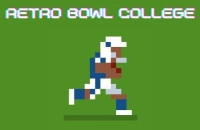
Retro Bowl College is a fun and casual sports game that lets you experience the excitement of college football right in your browser. Whether you're a fan of football or just looking for an entertaining game to pass the time, Retro Bowl College offers a great mix of simple gameplay and engaging strategy. Best of all, you can play Retro Bowl College online with no download required, making it easy to jump right into the action from any device with internet access.
About Retro Bowl College
Retro Bowl College is a casual browser game that puts you in the role of a college football coach and player. The game revolves around managing your team, making key decisions during the game, and executing plays to score touchdowns and win matches. With its retro-style graphics and straightforward mechanics, it captures the nostalgic feel of classic sports games while providing an enjoyable and approachable football experience. It's perfect for players who enjoy sports-themed games without complicated controls or lengthy tutorials.
How to Play Retro Bowl College
The main goal in Retro Bowl College is to lead your college football team to victory by scoring more points than your opponent. You start by selecting your team and then take control during the matches, where you call plays and make quick decisions to outsmart the opposing team.
To begin playing, simply load the game in your browser and follow the on-screen prompts to start a new season or match. During gameplay, you’ll need to choose offensive or defensive plays, time your moves carefully, and react to the flow of the game to succeed. The gameplay is designed to be easy to pick up, making it suitable for kids and casual players alike.
Enjoy Simple and Quick Football Fun
Retro Bowl College is designed for casual play, so matches are quick and exciting without overwhelming you with too many controls or complex strategies. The game's straightforward approach lets you focus on the fun of scoring touchdowns and managing your team, making it perfect for quick gaming sessions or longer playtimes. Its retro aesthetic adds a charming touch that appeals to players who enjoy classic-looking games with modern gameplay twists.
Retro Bowl College Controls
The controls in Retro Bowl College are simple and intuitive, allowing players to focus on the gameplay without hassle. Depending on your device, you may use the keyboard, mouse, or touch controls to play.
- Keyboard: Use arrow keys and specific keys to select plays and control actions.
- Mouse: Click on options to choose plays and make decisions during the game.
- Touch: Tap on-screen buttons if playing on a touchscreen device.
Tips and Tricks for Retro Bowl College
- Plan your plays carefully and adapt to your opponent’s strategy.
- Keep an eye on the clock and manage your timeouts wisely.
- Practice timing your passes and tackles to improve your game results.
- Use quick decisions to surprise your opponent and gain the advantage.
- Take breaks between matches to avoid fatigue and maintain focus.
Why Play Retro Bowl College on Adventuregames.io?
Playing Retro Bowl College on Adventuregames.io offers you the convenience of instant access with no download needed. You can enjoy the game directly in your browser, making it hassle-free and fast to start. The platform also features a wide collection of casual games, so you can discover new favorites easily after playing Retro Bowl College. It’s a great way for kids and casual gamers to enjoy quality games without installation or long setup times.
Similar Games You May Like
If you enjoy Retro Bowl College, you might also like these fun and casual sports and football-themed browser games:
Frequently Asked Questions About Retro Bowl College
Is Retro Bowl College free to play?
Yes, Retro Bowl College is free to play online in your browser without any cost.
Can I play Retro Bowl College online?
Absolutely! You can play Retro Bowl College online directly in your web browser with no need to download anything.
Do I need to download Retro Bowl College?
No download is required. The game runs smoothly in your browser, allowing you to start playing instantly.
What are the controls for Retro Bowl College?
The controls typically involve using the keyboard, mouse, or touch inputs depending on your device. You select plays and control actions using simple and user-friendly controls.
Is Retro Bowl College suitable for kids and casual players?
Yes, Retro Bowl College offers simple gameplay and a friendly interface that make it suitable for kids and casual players looking for quick and enjoyable sports gaming.
Comments
No comments yet. Be the first to comment.