
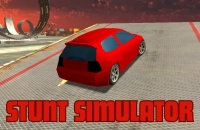






























































Play Stunt Simulator Online
Get ready to experience thrilling stunts and exciting challenges with Stunt Simulator, a fun casual game that you can play right in your browser. Whether you love fast-paced action or just want a quick gaming break, this game offers a simple yet entertaining way to enjoy stunt driving and daring maneuvers. The best part? You can play Stunt Simulator online with no download, making it easy and accessible for players of all ages on any device.
About Stunt Simulator
Stunt Simulator invites players to test their skills in a virtual environment where performing daring stunts is the main focus. As a casual game, it offers an enjoyable and straightforward experience that appeals to kids and casual gamers alike. The goal is to control your vehicle or character to pull off impressive tricks and navigate challenging courses, all while enjoying smooth gameplay directly in your browser without any installation required.
How to Play Stunt Simulator
Starting Stunt Simulator is easy and quick. After loading the game in a browser, you typically begin by selecting your vehicle or mode and entering the stunt arena or course. Your objective is to complete stunts, jumps, and tricks while maintaining control to avoid crashes or falls. Each level or stage may offer different challenges and environments, encouraging you to improve your timing and precision.
To get going, simply follow any on-screen prompts or menus to start the game and use the controls to drive, jump, or perform stunts. The gameplay is designed to be accessible, making it perfect for casual sessions whenever you have a few minutes to spare.
Enjoy Quick and Simple Fun with Stunt Simulator
Stunt Simulator shines as a casual game by offering quick play sessions that are easy to pick up and hard to put down. The fun comes from trying new tricks, mastering jumps, and exploring different stunt setups. Its straightforward gameplay means players don’t have to spend time learning complicated rules—just dive in and start performing stunts. This makes it ideal for players looking for light entertainment or a fun challenge without any stress.
Stunt Simulator Controls
The controls in Stunt Simulator are generally simple and designed for easy access. Depending on the device and version you play, the game may use keyboard, mouse, or touch controls to help you navigate and perform stunts.
- Keyboard: Use arrow keys or WASD to steer and control speed.
- Spacebar or a specific key may be used for jumps or tricks.
- Mouse or touch: Click, tap, or drag to control movement and stunts.
Tips and Tricks for Stunt Simulator
- Start slow to get a feel for the controls before trying complex stunts.
- Practice timing your jumps carefully to land safely and score points.
- Use the environment to your advantage—ramps, slopes, and obstacles can help with tricks.
- Don’t be afraid to retry levels to improve your performance and discover new stunt possibilities.
- Stay patient; mastering stunts takes practice and focus.
Why Play Stunt Simulator on Adventuregames.io?
Playing Stunt Simulator on Adventuregames.io offers the convenience of jumping straight into the action without waiting for downloads or installations. It’s perfect for casual players who want instant fun and easy access to games. The site’s collection also makes it simple to find similar games to enjoy after your stunt sessions. Plus, playing directly in your browser means you can enjoy the game on a variety of devices anytime you want.
Similar Games You May Like
If you enjoy the excitement and casual style of Stunt Simulator, these games might also catch your interest:
- Stunt Bike Extreme
- Fly Car Stunt
- Madalin Stunt Cars 2
- Madalin Stunt Cars 3
- Crazy Bikes
- Car Crash Simulator
Frequently Asked Questions About Stunt Simulator
Is Stunt Simulator free to play?
Yes, Stunt Simulator is free to play online, allowing you to enjoy the game without any cost.
Can I play Stunt Simulator online?
Absolutely! You can play Stunt Simulator online directly in your browser with no need for downloads.
Do I need to download Stunt Simulator?
No, Stunt Simulator can be played instantly in your browser with no download required.
What are the controls for Stunt Simulator?
Controls usually involve using the keyboard, mouse, or touch input, depending on your device. Basic controls include steering, accelerating, and jumping.
Can kids easily play Stunt Simulator?
Yes, the game’s simple controls and casual gameplay make it suitable and enjoyable for kids and players of all ages.
Comments
No comments yet. Be the first to comment.